
Digital Evaluation System for Universities: A Complete Guide for Exam Cells
It is the week after the semester exams. Bundles of answer books are stacked to the ceiling in the strong room, examiners are calling to ask when their packets will arrive, and the result date announced in the academic calendar is already looking difficult. Somewhere in the pile, a page will go missing, a total will be added wrongly, and a student will file for re-evaluation.
If that sounds familiar, you are the person this guide is written for. It explains what a digital evaluation system is, how it works from the exam hall to the published result, what changes for examiners and students, and how to plan your first digital cycle without disrupting the semester.
What is a digital evaluation system?
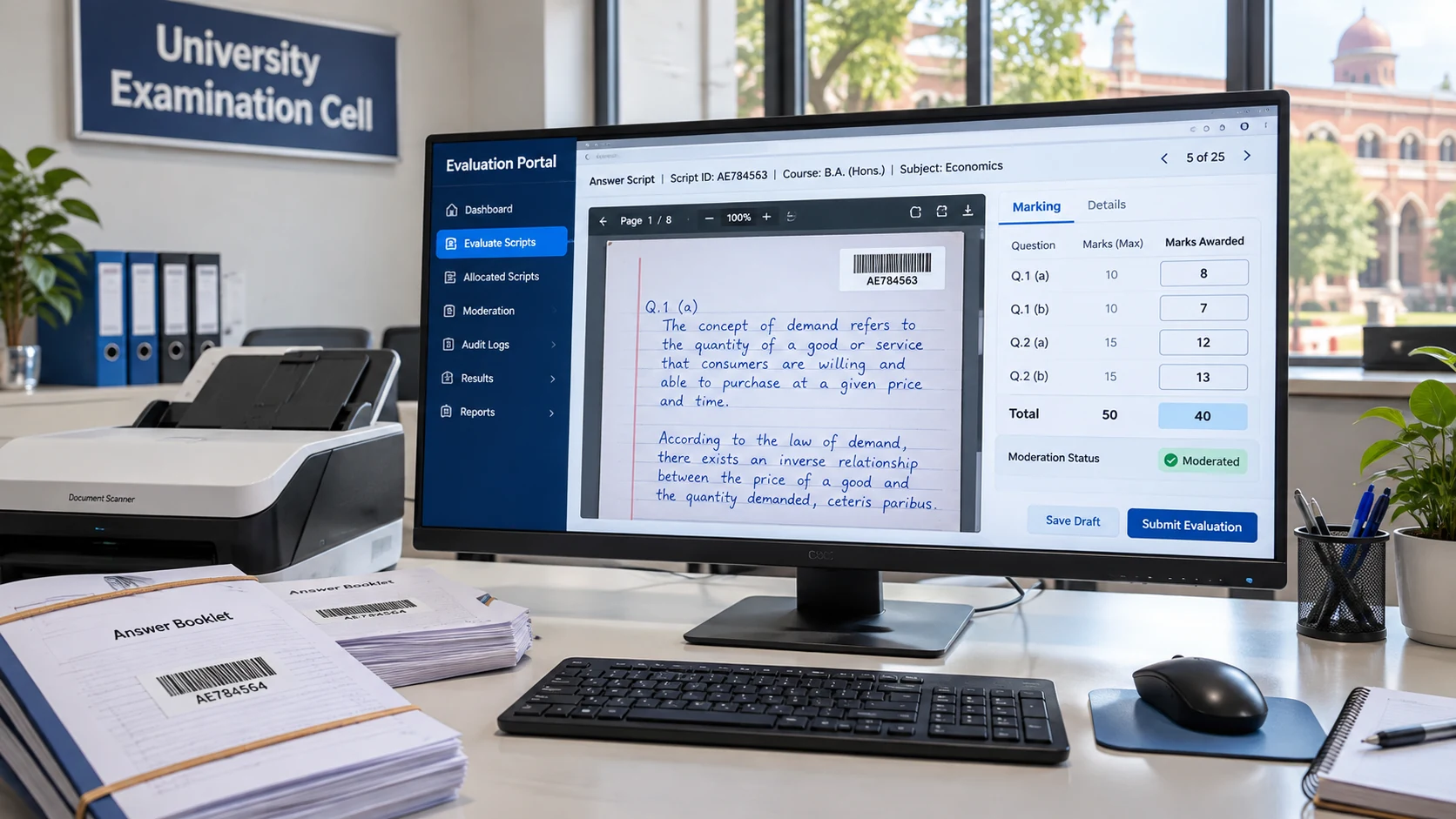
A digital evaluation system is software that lets examiners mark scanned answer sheets on a screen instead of on paper. Answer books are scanned after the exam, identified by barcode instead of the student’s name, allocated to examiners online, marked question by question, reviewed by moderators, and totalled automatically into results.
It is also called on-screen evaluation, on-screen marking or digital answer sheet evaluation. The words differ, but the idea is the same: the paper stays in one secure place, and only digital images move.
Why universities are moving away from paper evaluation
Paper evaluation has worked for decades, so why change it now? Because the problems it creates are becoming harder to defend.
Answer books travel too much
In a paper system, every bundle moves from the exam centre to the strong room, to the valuation centre, to the examiner, back to the strong room and, for re-evaluation, out again. Every movement is a chance for delay, damage or loss.
Totalling and entry errors
Marks are written on the answer book, added by hand, copied onto mark sheets and typed into a system. A single mistake at any step changes a student’s result, and these mistakes often come to light only when a student challenges them.
Results run late
When evaluation depends on physical movement and manual tabulation, small delays add up. Under the UGC (Redressal of Grievances of Students) Regulations, 2023, delays in declaring results beyond the academic calendar, and unfair or non-transparent evaluation, are both listed as valid student grievances (UGC Regulations, 2023). A late result is no longer only an internal problem. It can become a formal complaint.
Little visibility for the Controller of Examinations
With paper, the honest answer to “how many scripts are still unmarked?” is usually “we will find out by evening”. There is no live view of which examiner has which bundle, or which subject is falling behind.
How digital evaluation works, step by step
Every vendor’s process differs slightly, but a well-designed digital evaluation process follows these stages.
Step 1: Barcoded answer books
Each answer book carries a barcode that links it to the student’s record. The examiner never sees the student’s name or roll number, only the barcode. This keeps marking anonymous and removes the need for manual dummy numbering.
Step 2: Scanning and upload
After the exam, answer books are scanned at a secure centre and uploaded. From this point, the original paper stays locked away and only the digital copy is used. Scanning is the step exam cells worry about most, and it deserves careful planning: page counts, image quality checks and a re-scan process for any unclear page.
Step 3: Anonymous allocation to examiners
Scripts are allocated to examiners online by subject and paper. Because allocation is digital, the exam cell can balance workload, reassign scripts if an examiner is unavailable, and make sure no examiner receives scripts from their own institution if that is a rule.
Step 4: On-screen marking
The examiner logs in, opens each script and enters marks question by question against the marking scheme. The system adds the totals, so arithmetic errors disappear. A good system can also warn the examiner before a script is submitted with a question left unmarked.
Step 5: Moderation and review
A moderator or head examiner reviews a sample of marked scripts, or scripts that meet set conditions, such as large differences between examiners. Moderation that took days of physical re-checking can now happen on the same screen.
Step 6: Result compilation and publication
Once marking and moderation are complete, marks flow directly into result processing. Nobody has to type marks from a paper sheet into the result system, which removes another source of error.
Step 7: Re-evaluation and challenges
When a student applies for re-evaluation or a photocopy of the answer book, the scanned script is already available. It can be shared or sent to a second examiner within hours rather than retrieved from a strong room.
What changes for each person involved
- Examiners mark from their assigned location instead of travelling with bundles. They need a short training session and a reliable computer.
- The Controller of Examinations gets a live view of progress: scripts scanned, evaluated, pending moderation and published.
- Students get results with fewer totalling errors, and re-evaluation requests can be handled faster.
- The Registrar and IQAC get an auditable record of who evaluated what and when, which is useful evidence during inspections and accreditation.
Common concerns, and honest answers
“Our examiners will not accept it.”
This is the most common worry. In practice, resistance usually comes from unfamiliarity, not from the method itself. Start with a pilot, give examiners hands-on practice with sample scripts before live marking, and keep a help desk open during the first evaluation window.
“What about diagrams, graphs and long answers?”
Scanned images show exactly what the student wrote or drew. The quality of the scan matters more than the type of answer, which is why scanning standards and re-scan checks are so important.
“Is it secure?”
Ask every vendor how access is controlled, whether examiners can download or copy scripts, how student identity is hidden, and whether every action is logged with a time stamp. Security should be shown in the demo, not only described in a brochure.
“Will the first cycle disrupt our results?”
It can, if you try to move every programme at once. A phased start reduces that risk.
How to plan your first digital evaluation cycle
- Pick a pilot. Choose one or two programmes with a manageable number of scripts and cooperative examiners.
- Fix the scanning plan. Decide where scanning will happen, who will do it, and how page counts and image quality will be checked.
- Prepare marking schemes in advance. Question-wise marking needs question-wise schemes ready before evaluation opens.
- Train examiners on sample scripts. One practice session removes most first-day problems.
- Set up moderation rules. Decide which scripts moderators will review and how differences will be resolved.
- Run paper backup only where needed. Keep a fallback plan for the pilot, then retire it once the cycle runs smoothly.
- Review and expand. After results are published, review what slowed you down and add more programmes in the next cycle.
If you are the Vice Chancellor or management
Digital evaluation is not only an exam cell project. Late results and evaluation disputes affect your institution’s reputation, student grievances and, through result data, rankings and accreditation. When your team proposes digital evaluation, ask three questions: what will the pilot cover, how will examiner adoption be handled, and how will progress be reported to you during the evaluation window?
If you are the IT head
Your questions are practical. Where are scanned images stored, and who can access them? Does the system connect to the existing student and examination records, or will data be imported by hand? What internet speed do examiners need? How are users added and removed each cycle? Ask the vendor to show the audit log and the access controls live in the demo.
How iCloudEMS helps universities move to digital evaluation
The iCloudEMS Digital Evaluation solution is built for Controllers of Examinations who need a paperless, auditable evaluation cycle. Features described on the iCloudEMS website include:
- Scanning and digital upload of answer sheets, so paper does not move between people.
- Barcode-based anonymous allocation, so examiners never see student identities.
- Secure digital allocation of scripts to examiners.
- On-screen marking, question by question.
- Built-in moderation, with pending moderation visible on the dashboard.
- Re-evaluation and challenge workflows inside the same system.
- A time-stamped audit trail for every step of the evaluation cycle.
- Automatic compilation of marks and publication of results once evaluation is complete.
- A live dashboard showing scripts scanned, evaluated, pending moderation and published, with overall progress.
- Question banks aligned with Bloom’s Taxonomy and mapped to course outcomes, and evaluation data that can be used as accreditation evidence through the Accreditation and Compliance solution.
Because digital evaluation runs on the same platform as academics, examinations and student records, marks move into results without re-entry.
Frequently asked questions
What is a digital evaluation system?
It is software that lets examiners mark scanned answer sheets on screen. Scripts are identified by barcode, allocated online, marked question by question, moderated and totalled automatically into results.
Is digital evaluation the same as an online exam?
No. In digital evaluation, students still write the exam on paper. Only the checking happens on screen. In an online exam, students answer on a computer.
How does digital evaluation keep marking anonymous?
Each answer book carries a barcode instead of visible student details, so examiners see only the barcode and the answers.
Does digital evaluation help with re-evaluation?
Yes. Because every script is already scanned, it can be shared with the student or sent to a second examiner quickly, without retrieving the paper from storage.
How should a university start with digital evaluation?
Start with a pilot of one or two programmes, plan scanning carefully, train examiners on sample scripts and expand after the first cycle is reviewed.